Skip to content

Tapered Label Generator for Tubs and Cups

PackDesignAI is a free tapered label generator that draws labels for tapered containers: type the top and bottom diameter and the height of a tub, cup or tin, and get the exact curved template with bleed and a safe area. Download vector PDF, SVG, DXF or PNG; your first download is free. No watermark, nothing uploaded.

Tapered label generator

Your container

Common sizes

Starting points only: sizes vary by maker, so measure yours.

in
in
in
top diameterbottom diameterheight

Measure across the outside at the top and bottom of the tapered wall, then the height. The label can cover the whole wall or a band of it.

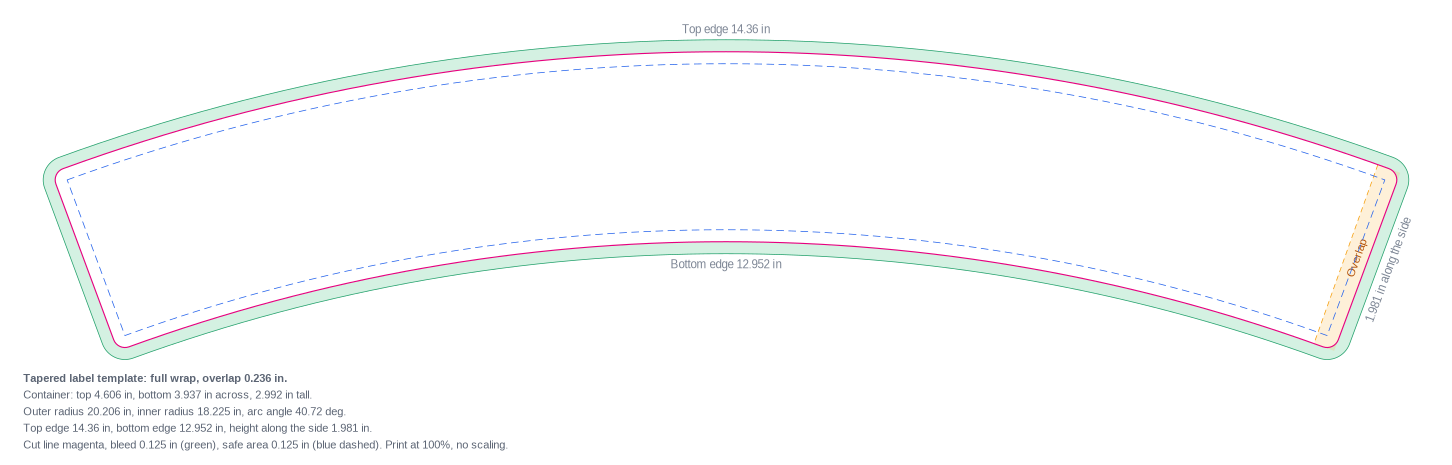
Tapered label templateOverlapTop edge 14.36 inBottom edge 12.952 in1.981 in
14.06 in x 3.119 in

The math

Outer radius

20.206 in

Inner radius

18.225 in

Arc angle

40.72°

Top edge

14.36 in

Bottom edge

12.952 in

Height along the side

1.981 in

Flat size of one piece

14.06 x 3.12 in

Around at mid height

13.42 in

Arc rise

1.262 in

Vector PDF at 100% on Tabloid, picked to fit.

  • Free to design
  • First download free
  • No watermark
  • Runs in your browser

Print at 100% (Actual size) and check a test print on your container before a full run.

  • First download free
  • Exact arc from 3 sizes
  • PDF, SVG, DXF and PNG
  • 3D preview on the tub

Tapered Label Templates Drawn by the Tool

Every card is real output of the tapered label generator: the cut line in magenta, bleed in green and the safe area dashed in blue.

Curved full wrap label template for a 16 oz tapered tub with bleed and safe area
16 oz tubFull wrap, about 14 in wide, printed on Tabloid
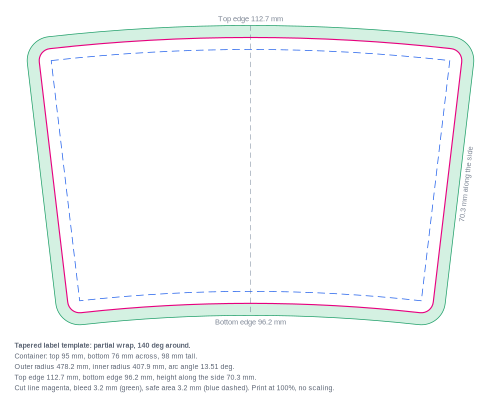
Curved front label template covering 140 degrees of a pint tub
Pint tubFront label, 140 degrees around
Curved full wrap label template for a small tapered tin
Tapered tinA full band that fits on Letter
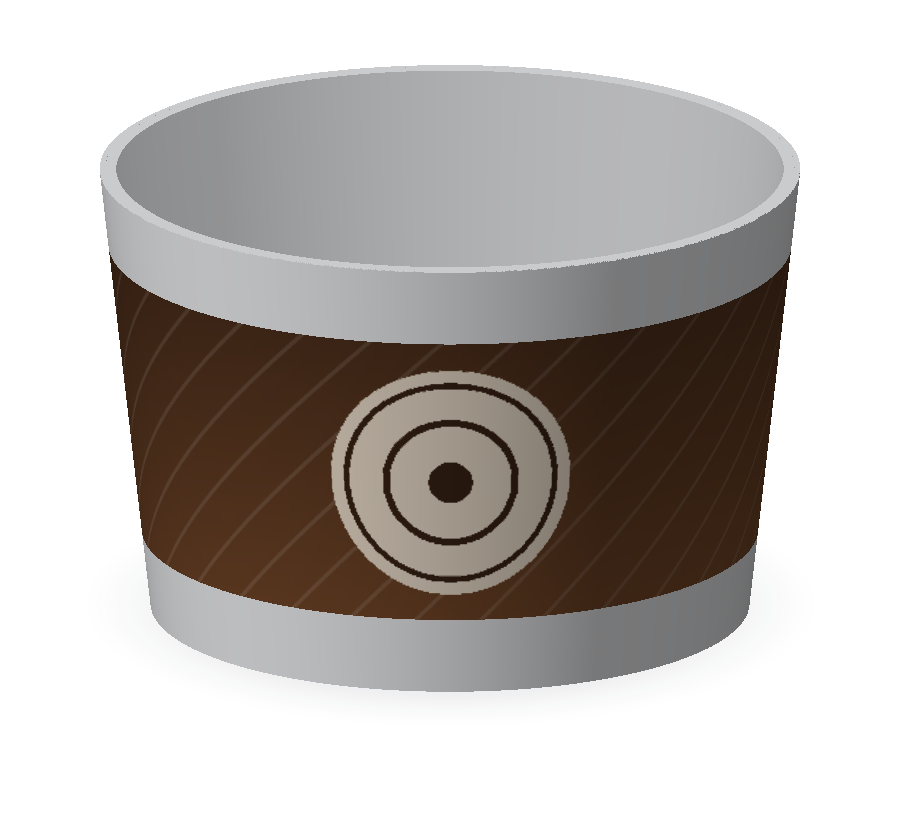
3D preview of a tapered tub with a brown patterned label wrapped around it
3D viewYour art on the tub before you print
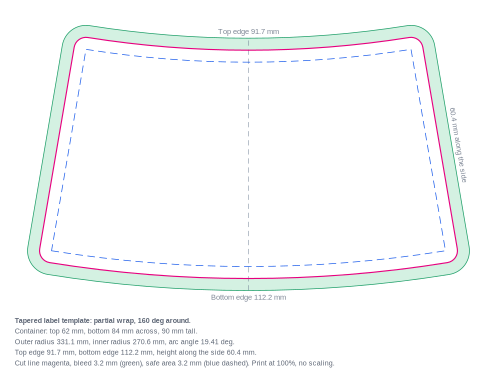
Label template that curves the other way for a jar wider at the bottom
Wider at the baseThe arc flips when the bottom is wider
Curved band label template covering half of a 12 oz cup
12 oz cupA band label half way around a cup

Real output of the tool. Use this example opens that container in the generator above; sizes are starting points, so measure yours.

Make Labels for Tapered Containers in 3 Steps

Three numbers in, a print ready tapered label template out.

  1. Measure across the outside at the top and at the bottom of the sloped wall, then the height. Type diameters or circumferences in inches or millimeters, and say whether the height runs straight up or along the side.

  2. Pick a full wrap with an overlap, or a front label set by angle or width. Choose the label height and the space from the top, or leave it centered, then add bleed, a safe area and rounded corners.

  3. Read the Checks tab, turn the label in 3D, then download vector PDF, SVG, DXF or PNG. Print at 100% and try one label on a real container before a full run.

A tapered tub with a label band, the shape you measure

A Tapered Label Generator Built on Cone Math

Not a stretched rectangle: a template worked out from the shape of your container.

  1. Tapered front label with edge lengths printed along the arcs

    The math

    The exact arc for your taper

    A sloped wall unrolls into a ring segment, so a conical label has a long arc and a short arc. The tool works out the outer and inner radius, the arc angle, both edge lengths and the arc rise from your sizes, and Copy the numbers puts them on your clipboard.

  2. Artwork wrapped on a tapered tub in the 3D preview

    Artwork and 3D

    Flat art bent onto the curve

    Upload a PNG, JPG, WebP or SVG up to 40 MB and it is warped onto the arc with Fill, Fit or Stretch, so it sits level on the container. Then drag the 3D view, spin it, or switch the container to white, kraft or black. Your image never leaves this browser.

  3. A wide full wrap label template for a tub

    Checks

    Warnings before you waste a sheet

    Checks flag a label taller or wider than the container, an arc too curved for one piece, a zero or very long overlap, a safe area with no room left and artwork under 150 dpi, and say whether it fits Letter or A4. The 16 oz tub wrap is about 14 in wide: it prints on Tabloid, or on Letter in 2 pieces.

  4. Vector label template with cut line, bleed and safe area

    Print files

    Vector files at actual size

    The PDF prints at 100% on the smallest of Letter, A4, Tabloid and A3 that fits, or the sheet you pick, with the cut line as a CutContour spot color and each part on its own layer. SVG comes in millimeters with layers, DXF holds the cut line for a cutter or CAD, and PNG goes up to 300 dpi.

How Conical Labels Work

Four short notes before you print your first tapered label template.

Why a label for a tub is curved

A tub or cup that narrows toward the base is a slice of a cone. Unroll its wall and you get two arcs around one center, joined by two straight sides. A plain rectangle on the same tub climbs at one end and drops at the other, which is why it looks crooked.

The bigger the gap between the top and bottom size, and the shorter the wall, the tighter the curve of a conical label. When the base is wider than the top, as on some jars, the arc simply flips.

How to measure a tapered container

Use a ruler or calipers, and measure the outside of the wall the label will touch.

  1. 1Top: across the outside at the top of the sloped wall.
  2. 2Bottom: across the outside at the bottom of the wall.
  3. 3Height: straight up beside the container, or along the side with a tape. Pick the matching option.
  4. 4No calipers? Wrap a paper strip around it and type the circumference instead.

The size chips are starting points only. Tubs, cups and tins vary by maker, so measure yours and print a test.

Full wrap, front label or pieces

A full wrap goes all the way around and laps over itself; a small overlap hides small measuring errors. A front label covers part of the way, set by an angle such as 120 or 180 degrees or by its width at mid height.

When a full wrap would curl past a full circle on the sheet, or is too wide for your paper, split it into 2 to 4 equal pieces that each overlap the next. The PDF puts one piece per page when they do not fit together.

Printing your tapered label template

Print at 100% (actual size) with scaling off. Turn off measurements, the safe area, bleed or guides before printing: each is its own layer in the PDF and SVG.

Artwork is embedded as an RGB image at up to 300 dpi, so ask your printer about color if you print on a press. Diameters from 5 to 2000 mm work, and the label must be at least 3 mm tall.

Who Uses the Tapered Label Generator

Anyone with a container that is wider at one end.

  • Ice cream and deli makers

    A full wrap or a front label for pint tubs and deli pots, sized to the tub on your shelf.

  • Candle and cosmetic brands

    Labels for tapered containers such as tins and jars, including ones wider at the base.

  • Packaging designers

    An exact arc in millimeters, with layers, to place artwork on in your vector program.

  • Crafters with cutters

    A DXF cut line, or a PDF with a CutContour line, to set up in your cutter software.

Tapered Label Generator FAQ

Quick answers about sizes, artwork and files.

Make Your Tapered Label Template

Three sizes in, a curved template out: the tapered label generator draws labels for tapered containers as PDF, SVG, DXF or PNG. Free to design, first download free, nothing uploaded.