Skip to content

Free Rectangle Box Template in Any Size

PackDesignAI is a free rectangle box template maker for tuck end cartons: type length, width and height in inches or mm, or tap a common size, and get a reverse tuck end box with fold allowances for your board. Download vector PDF, SVG, DXF or a 300 dpi PNG. Free to design without an account, no watermark, nothing uploaded.

Dieline generator

Reverse tuck endECMA A20.20.03.01 style

Inside dimensions

in

Front, left to right

in

Side, front to back

in

Bottom to top

Measure your product, then add 1 to 3 mm (about 1/16 in) on each side so it slides in.

Common sizes

Fills length, width and height.

CutCreaseBleed
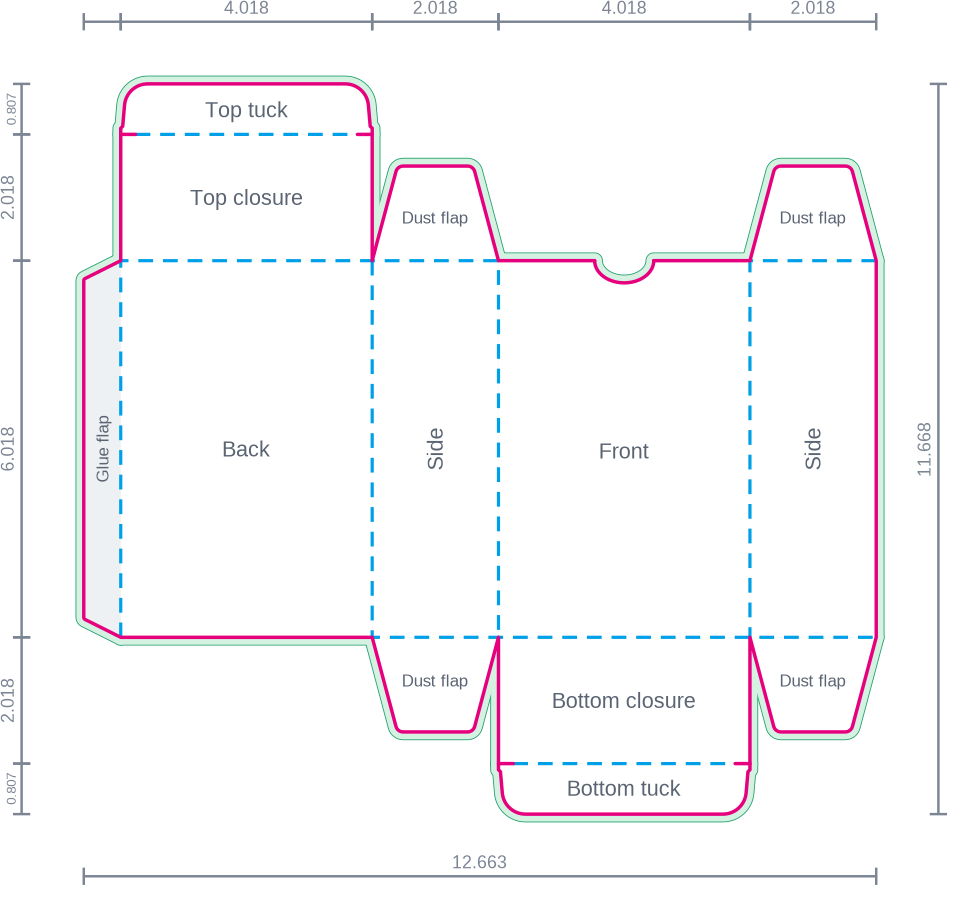
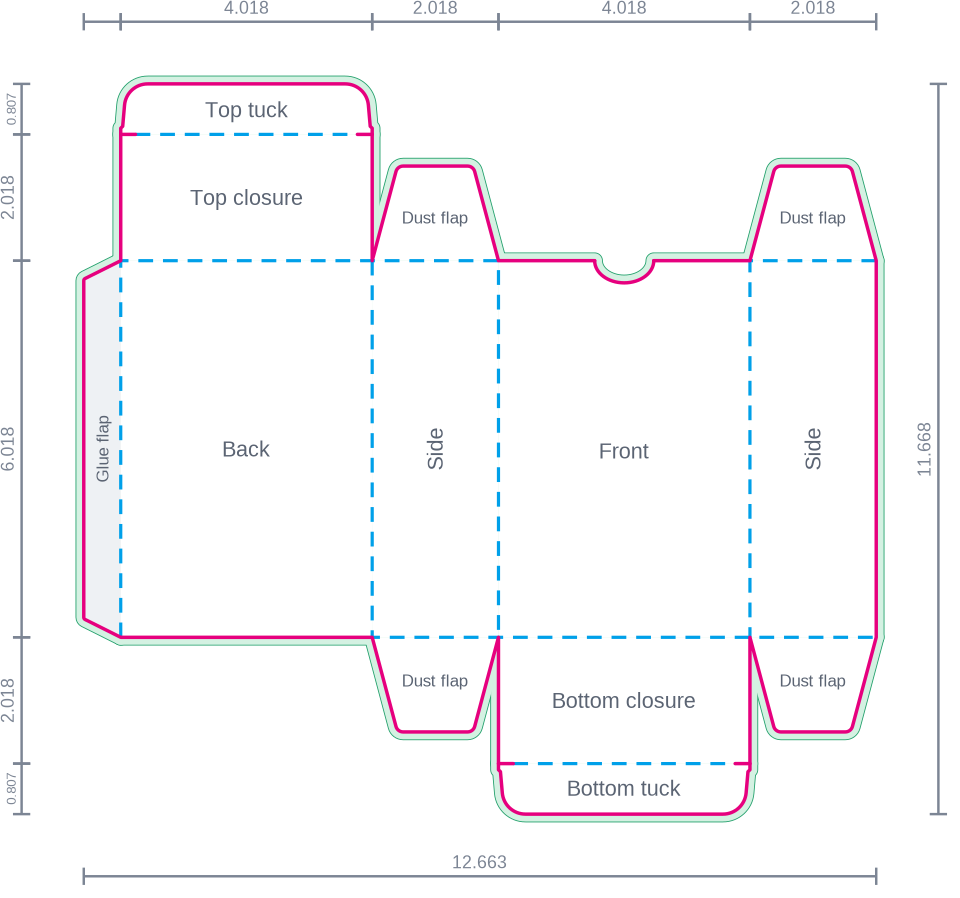
Flat dieline previewFrontSideSideBackGlue flapDust flapDust flapTop closureTop tuckDust flapDust flapBottom closureBottom tuck4.0182.0184.0182.01812.6630.8072.0186.0182.0180.80711.668

Flat size 12.663 x 11.668 in · 18pt SBS · Caliper 0.018 in

Vector PDF at 1:1, page 15.108 x 14.114 in. Cut and crease are spot colors (CutContour, Crease) on their own layers.

Design this box with AISaved in this browser
  • First download free
  • Runs in your browser
  • Nothing uploaded
  • No watermark

Print and fold a sample before production. Board, printing and folding all vary.

  • First download free
  • Inches or millimeters
  • PDF, SVG, DXF and PNG
  • 3D fold preview

Rectangle Box Templates in Three Common Sizes

Every rectangle box template here is real output: a reverse tuck end carton on 18 pt board, with cut lines solid, crease lines dashed and panels named.

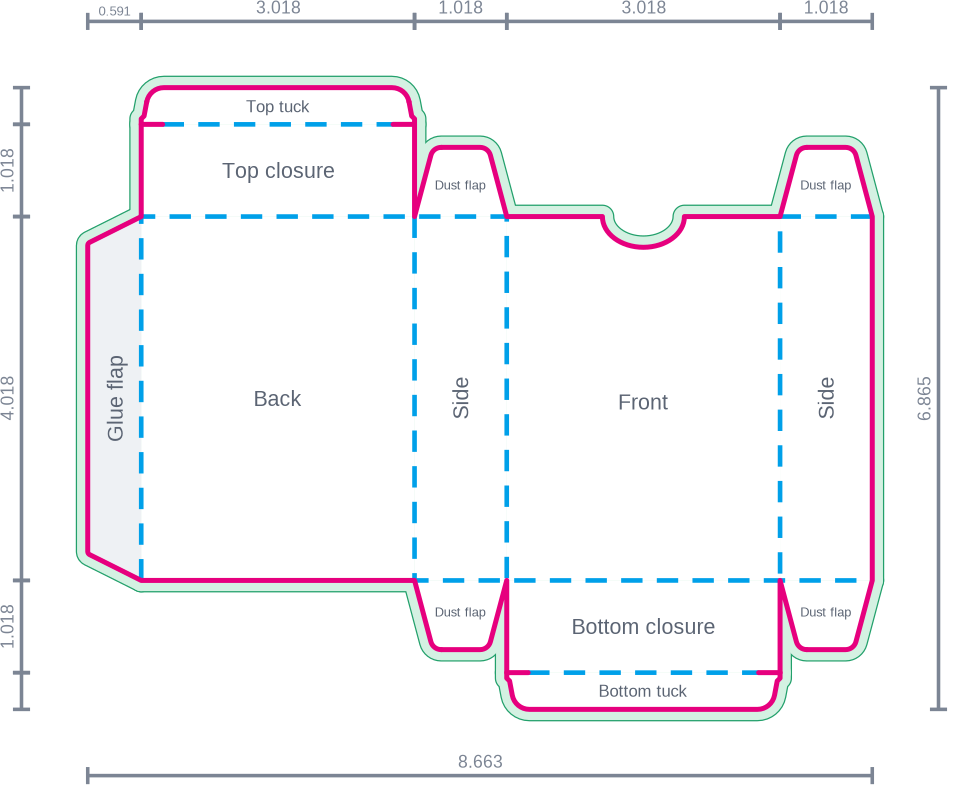
Flat dieline of a 3 by 1 by 4 inch reverse tuck end box
3 × 1 × 4 inSlim carton that fits a Letter sheet
Flat dieline of a 4 by 2 by 6 inch rectangle box with dimensions
4 × 2 × 6 inThe starting size, with every panel named
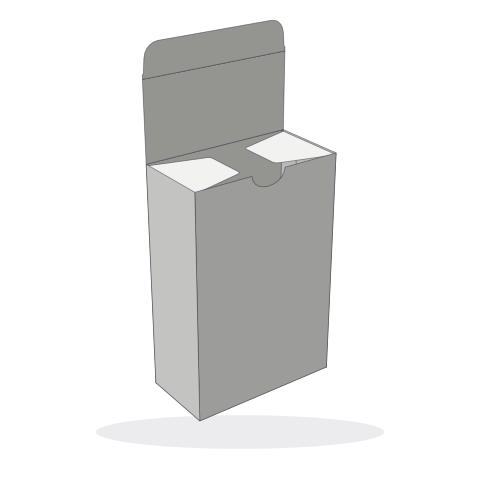
3D preview of a rectangle tuck end box folding
3D viewTucks closing from opposite sides
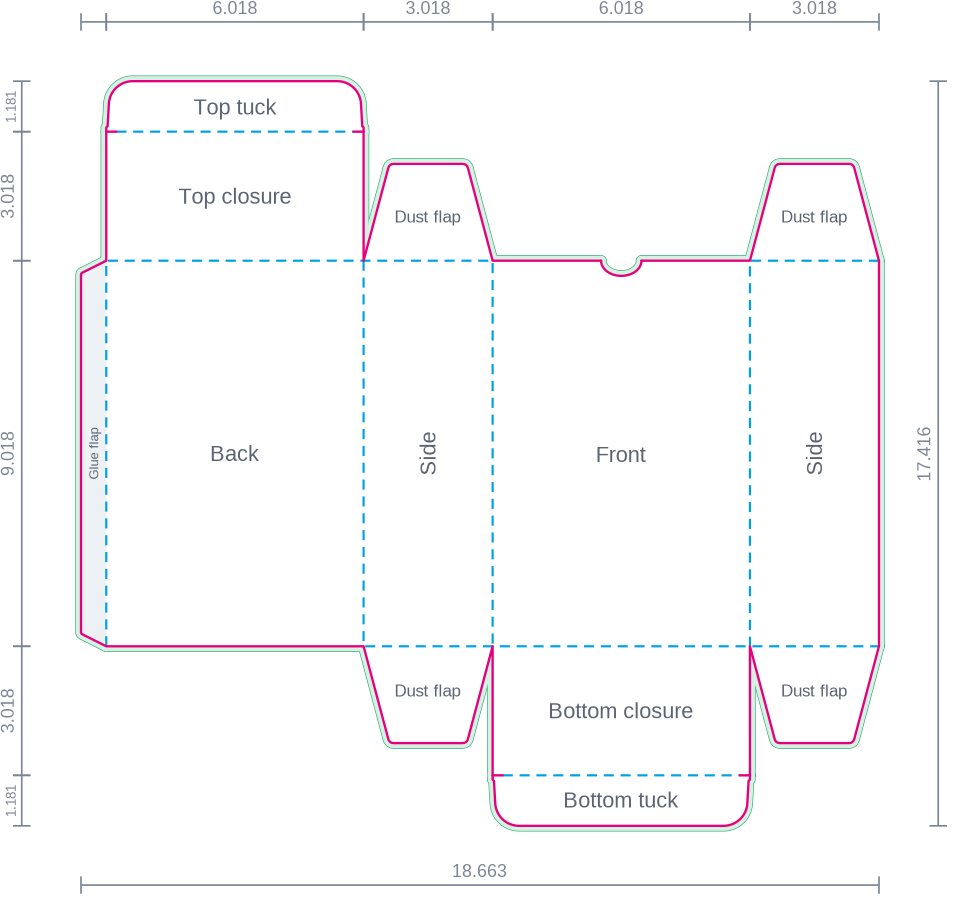
Flat dieline of a 6 by 3 by 9 inch rectangle box
6 × 3 × 9 inLarger than A3, for a print shop

Real output of the tool. Use this example opens that size in the generator above.

How to Make a Rectangle Box Template

Measure, set the board, download: three steps to a box you can fold.

  1. Length runs across the front, width across the side and height from bottom to top. Type them in inches or millimeters, or tap 3 × 1 × 4, 4 × 2 × 6 or 6 × 3 × 9 in.

  2. Pick 14 to 24 pt SBS, kraft, a flute or your own caliper. Then adjust the tuck and dust flaps, add a window or thumb notch, and set bleed to 3 mm, 1/8 in or none.

  3. Fold it in 3D, read the Checks tab, then download a vector PDF, SVG, DXF or 300 dpi PNG. Print a sample at 100% and fold it before you order a run.

Slim rectangle box dieline at its flat size

A Rectangular Box Template That Follows Your Product

Change one number and every panel, flap and dimension moves with it.

  1. Rectangle box dieline with panel widths and flap depths dimensioned

    Exact size

    Three numbers, every panel

    Each panel is drawn crease to crease with an allowance for the board caliper, so the inside stays at the size you typed. The flat size updates under the preview, and Zoom 1:1 shows the drawing at real size on a standard screen.

  2. Reverse tuck end box with its tucks folding closed

    Reverse tuck

    Tucks that close from opposite sides

    The top tuck hinges on the back panel and the bottom tuck on the front, the classic retail carton. Slit locks catch the dust flaps, and tuck length and dust flap depth stay automatic until you type your own.

  3. Large rectangle box dieline ready for a check

    Checks

    Warnings before you cut

    The Checks tab flags a box over 8 times longer than it is wide, a board too thick for the smallest panel, a short tuck or a narrow glue flap. Every warning has a Why? note, and the rectangle box dieline cannot be downloaded until the red ones are fixed.

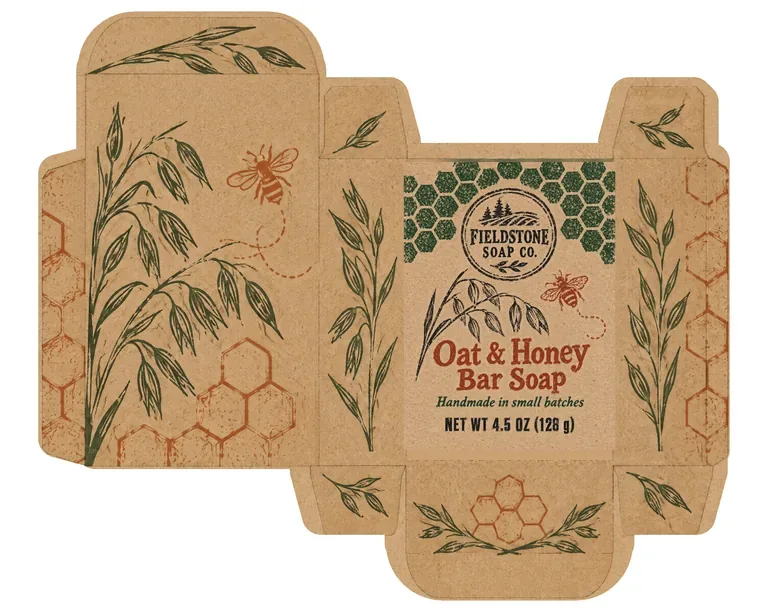
  4. Partner demo: kraft soap carton artwork laid out on a flat dieline

    Artwork

    A layout guide for your design

    Turn on panel names and the flat drawing works as a rectangle layout template for the artwork. Place your design in your own program, or open the box designer to design it with AI (AI designs use credits). Pictured: a partner demo made with AI.

Rectangle Box Dieline Basics

Measuring, tuck styles, board and printing in four short notes.

How to measure the product

Measure the item at its widest points, then add 1 to 3 mm on each side so it slides in, and type that into the rectangle box template. The face customers see is the length, the depth is the width, and a standing carton puts its longest side in height.

Packing something with a lid or a pump? Measure with the cap on.

Reverse tuck or straight tuck?

A reverse tuck end box template closes the top toward the back and the bottom toward the front. It is the usual pick for cosmetics, tea and small retail goods, and the one this page draws.

A straight tuck end closes both ends on the same side so the front stays clean, as on the cereal box template.

Which board to choose

Most folding cartons use 14 to 24 pt SBS; this rectangular box template starts at 18 pt. F or E flute suits heavier products.

B and C flute get a warning on a tuck end box because the tucks are hard to close; a mailer box template suits thick board better.

Printing a sample

The 3 × 1 × 4 in box fits US Letter with every layer on, and A4 once you hide Dimensions. The 4 × 2 × 6 and 6 × 3 × 9 in boxes are larger than A3, so print them at a print shop or on a wide format printer.

Send the PDF to your printer or die maker and let them check it against their board and die. A template is a starting point, not a production sign off.

Who Uses a Rectangular Box Template

From a first product sample to a classroom project.

  • Small product brands

    Cartons for soap, tea, candles and cosmetics, sized to the product before the first print run.

  • Packaging designers

    A rectangle box dieline to sketch on, mock up and hand to the printer with the artwork.

  • Online sellers

    A neat retail box for marketplace photos and gift sets, printed and folded at home in small sizes.

  • Teachers and students

    Measure a real object, make the box, fold it: a hands on lesson in nets and volume.

Rectangle Box Template FAQ

Short answers about size, board and files.

Get Your Free Rectangle Box Template

Type the size, pick the board and download a rectangle box template as PDF, SVG, DXF or PNG. First download free, nothing uploaded.