
Skip to content

Free Chip Bag Template, Film Print Layout

PackDesignAI is a free chip bag template maker for pillow pouches: type the finished bag width and length, or tap a common snack bag size, and get the flat film print layout with the back fin seal, end seals and tear notches marked. Download vector PDF, SVG, DXF or PNG. Free to design without an account, no watermark.

Dieline generator

Chip bag (pillow pouch)Flat film print layout with a back fin seal and end seals. Not a carton.

Finished size

in
in

Width and length of the finished bag, seals included.

Common sizes

Fills width and height.

CutCreaseBleed
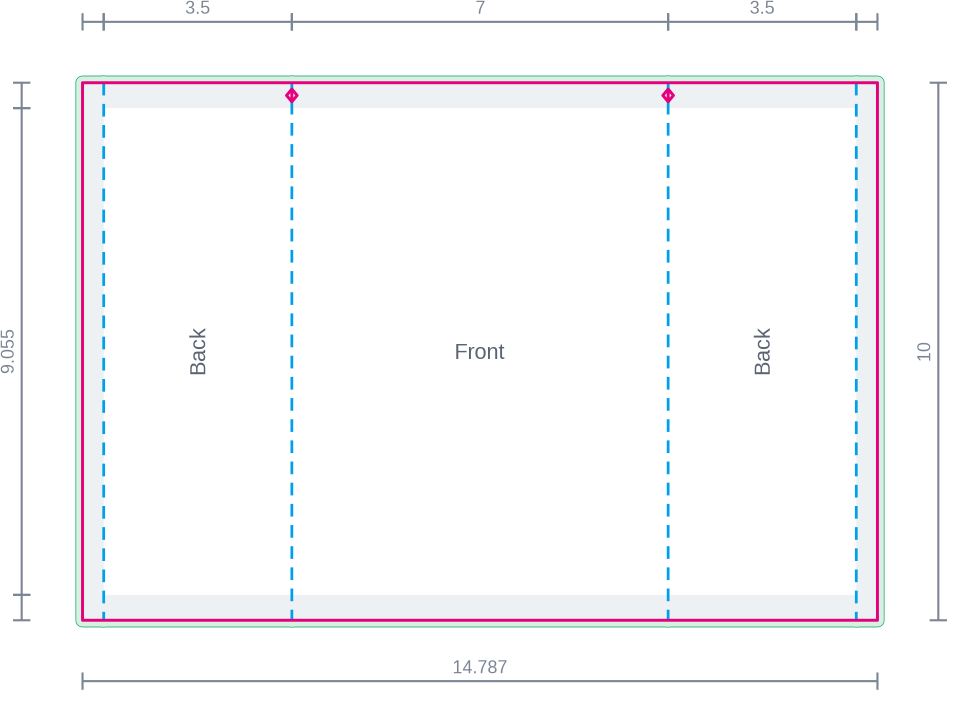
Flat dieline previewBackFrontBack3.573.59.05514.78710

Flat size 14.787 x 10 in · Flexible film · Caliper 0.003 in

Vector PDF at 1:1, page 17.496 x 12.708 in. Cut and crease are spot colors (CutContour, Crease) on their own layers.

Design this box with AISaved in this browser
  • First download free
  • Runs in your browser
  • Nothing uploaded
  • No watermark

Print and fold a sample before production. Board, printing and folding all vary.

  • First download free
  • Film layout, not a box
  • Seals and notches marked
  • PDF, SVG, DXF and PNG

Chip Bag Templates in Four Bag Sizes

Each chip bag template below is a real film layout from the tool: front in the middle, the back in two halves, seal areas shaded and tear notches in the top seal.

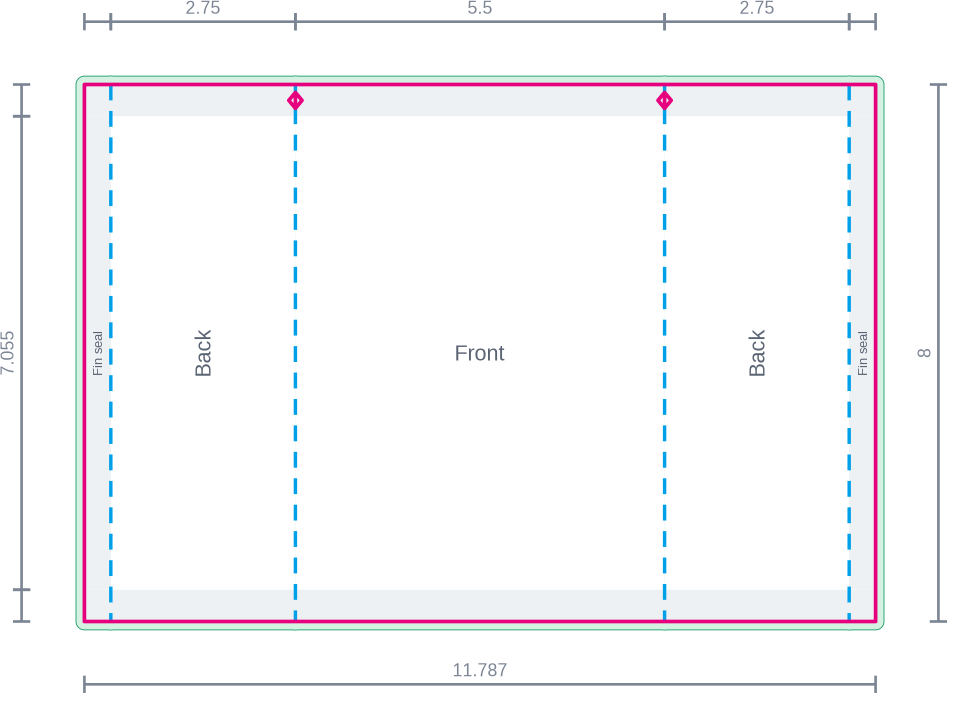
Flat film layout of a 5.5 by 8 inch chip bag with seal areas shaded
5.5 × 8 inA small snack bag, test prints on Tabloid or A3
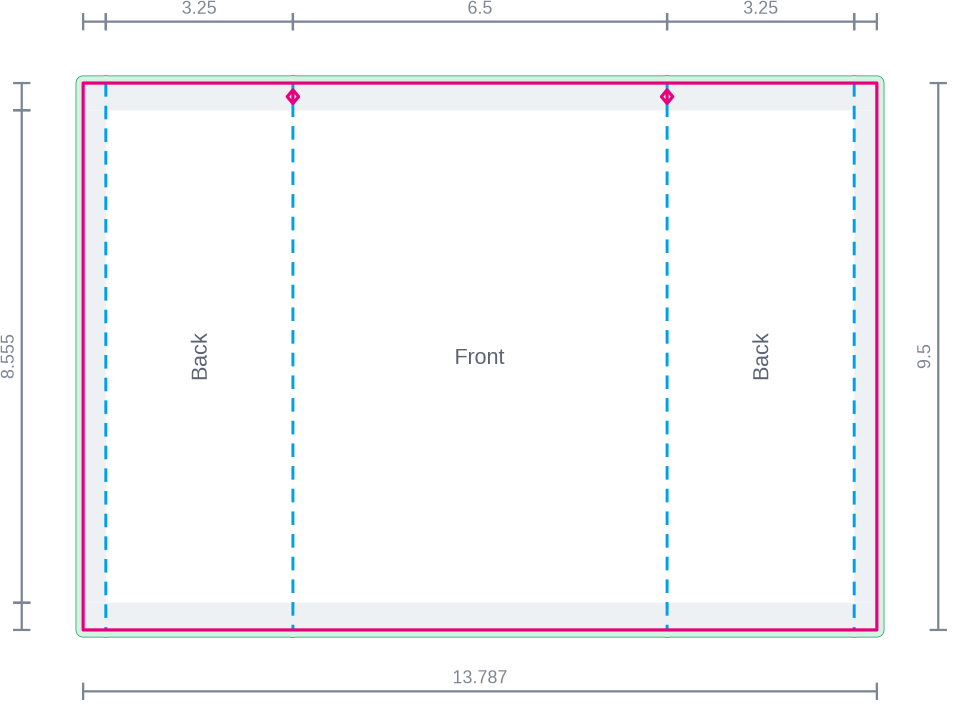
Flat film layout of a 6.5 by 9.5 inch chip bag
6.5 × 9.5 inA mid size bag with back fin seal
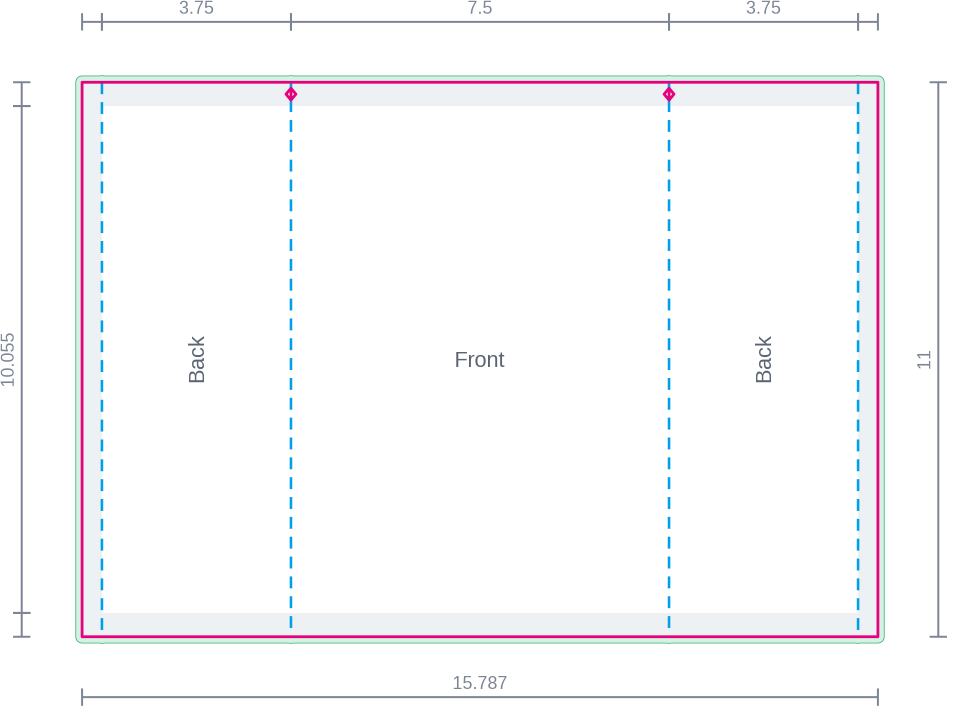
Flat film layout of a 7.5 by 11 inch chip bag with end seals
7.5 × 11 inA family size bag, end seals at both ends
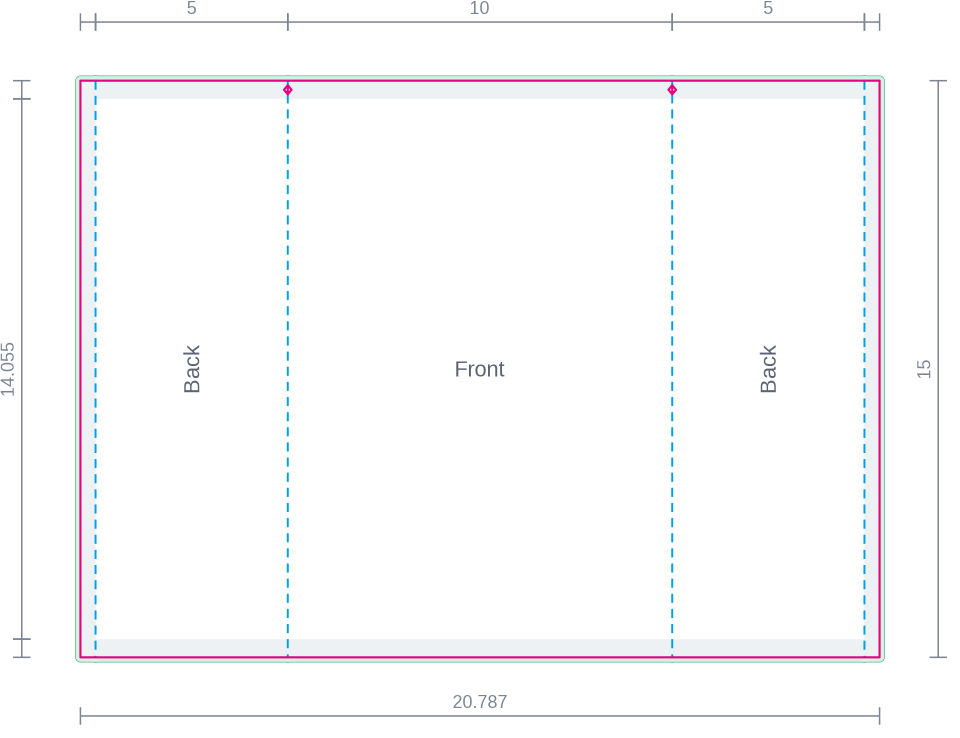
Flat film layout of a 10 by 15 inch chip bag
10 × 15 inA party size bag, larger than A3

Real output of the tool. Use this example opens that size in the generator above.

How to Make a Chip Bag Template

Size the bag, set the seals, hand the layout to your printer.

  1. Enter the width and length of the finished bag, seals included, in inches or millimeters, or tap 5.5 × 8, 6.5 × 9.5, 7.5 × 11 or 10 × 15 in.

  2. End seals start at 12 mm and the fin seal at 10 mm on each film edge. Change them to match your packer, and keep or remove the tear notches in the top seal.

  3. Read the Checks tab, then download vector PDF, SVG, DXF or PNG. Put your artwork on the front and back panels and keep text out of the shaded seals.

Small chip bag film layout at its flat size

A Chip Bag Dieline Drawn for Film

A flat print layout for one pillow pouch, not a carton you fold and glue.

  1. Chip bag film layout showing front, two back halves and fin seals

    Layout

    How the film wraps around

    The front sits in the middle, the back is split in two halves, and a fin seal runs along each film edge. The film is twice the bag width plus both fins: the halves meet at the back, where the fins seal face to face.

  2. Chip bag layout with shaded seals and tear notches

    Seals

    Seals and notches you can see

    End seals and fin seals are shaded, so artwork stays out of them. Tear notches are small V cuts at both sides of the top seal. The Checks tab warns about seals under 6 mm or fins under 5 mm, and stops a bag too short for its seals.

  3. Large chip bag film layout as a vector file

    Files

    Vector files for your printer

    Download a vector PDF at 1:1, an SVG in millimeters with outline, folds, seal tint, bleed and labels on separate layers, a DXF R12 or a 300 dpi PNG. The chip bag dieline opens in common vector and CAD programs.

  4. Partner demo: striped green dill pickle popcorn bag front

    Artwork

    Design the front panel

    The layout is lines only. Place your design in your own program, or let AI packaging design draw the front (AI designs use credits). Pictured: a partner demo of snack bag artwork made with AI.

How a Snack Bag Template Works

What the file holds, what your printer adds, and paper bags at home.

A film layout, not a box

A pillow pouch starts as printed film. The packing machine wraps it into a tube, seals the fin at the back, seals the ends and cuts each bag. This pillow pouch template is that film for one bag, laid flat, so there is no 3D preview.

It draws the plain pillow pouch only: no stand-up bottom, side gussets, zipper or hang hole.

Sizes and seal widths

In this snack bag template, width and length are the finished bag, seals included. The chips are approximate snack bag sizes, and seal widths depend on the packing machine, so confirm both with your packer before artwork starts.

What your printer adds

The file holds one bag. Your printer or converter adds the rest for the press:

  1. 1The roll layout, with bags repeated along the web.
  2. 2Eye marks and registration marks.
  3. 3The film structure and any barrier layers.

Paper favor bags at home

Making party bags from paper instead? Print the layout, fold on the dashed lines and glue the shaded seal areas. It is drawn for film, so fold one test bag first. The 5.5 × 8 in bag fits Tabloid or A3.

Who Uses a Chip Bag Template

From a first snack launch to a birthday party.

  • Snack startups

    A chip bag dieline to brief the designer and the converter before the first print run.

  • Packaging designers

    The right panels for the front, the back and the seals, so nothing important lands in a seal.

  • Party and favor makers

    A printable chip bag template for paper favor bags, folded and glued by hand.

  • Design students

    Learn how flexible packaging is laid out, from fin seal to tear notch.

Chip Bag Template FAQ

Straight answers about the layout, seals and files.

Get Your Free Chip Bag Template

Type the bag size, set the seals and download a chip bag template as PDF, SVG, DXF or PNG. First download free, nothing uploaded.