Skip to content

Free Cube Template to Print at Any Size

PackDesignAI is a free cube template maker for paper and card cubes: type a size in inches or mm, or tap 1 to 4 in, and get a cube box with tuck flaps, a glue flap and creases set for your board. Download vector PDF, SVG, DXF or a 300 dpi PNG. Free to design without an account, no watermark, nothing uploaded.

Dieline generator

Reverse tuck endECMA A20.20.03.01 style

Inside dimensions

in

Front, left to right

in

Side, front to back

in

Bottom to top

Measure your product, then add 1 to 3 mm (about 1/16 in) on each side so it slides in.

Common sizes

Fills length, width and height.

CutCreaseBleed
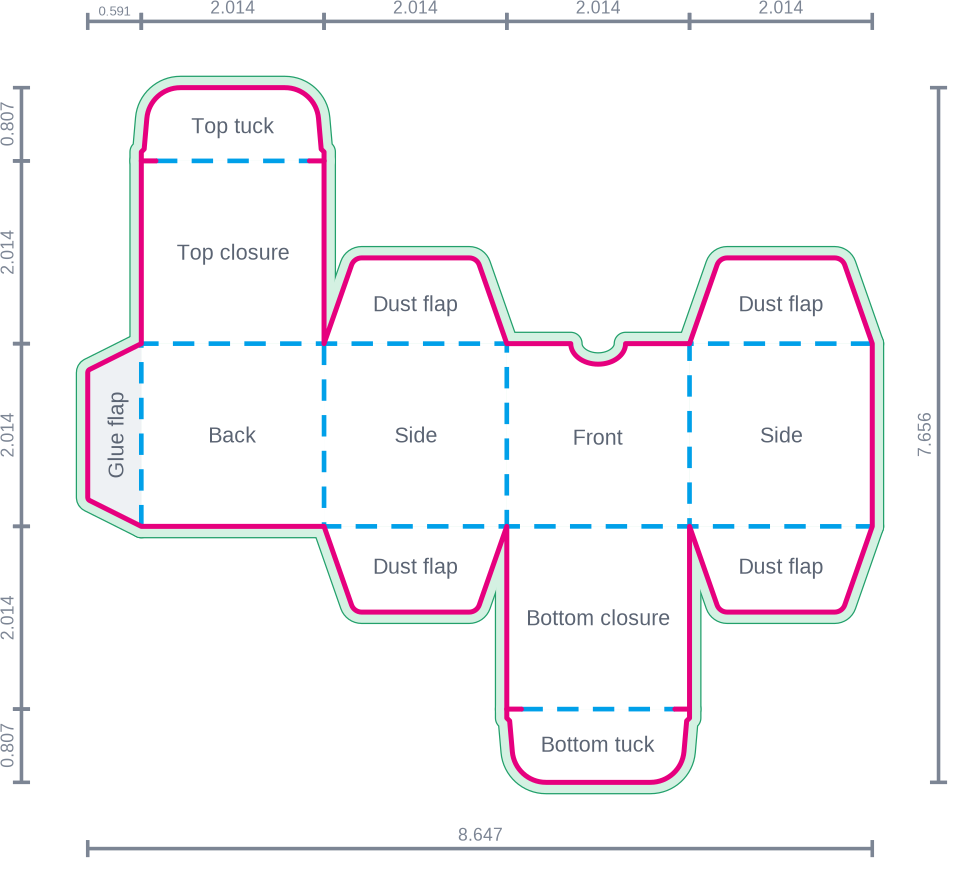
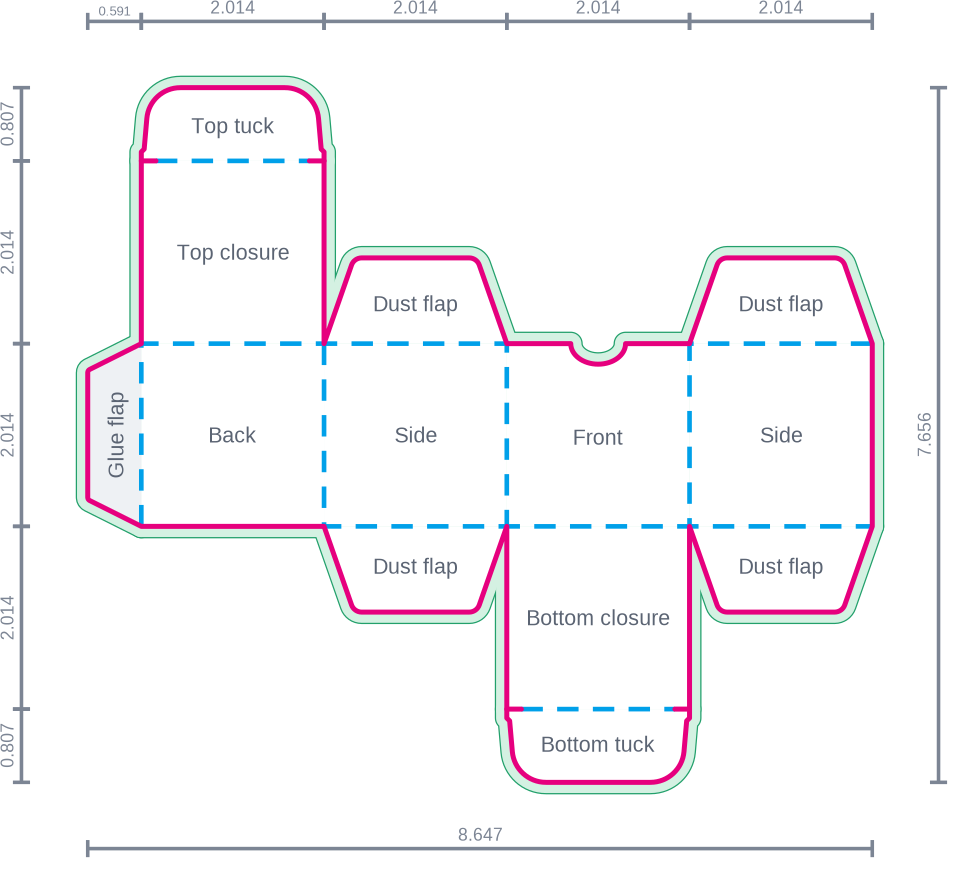
Flat dieline previewFrontSideSideBackGlue flapDust flapDust flapTop closureTop tuckDust flapDust flapBottom closureBottom tuck0.5912.0142.0142.0142.0148.6470.8072.0142.0142.0140.8077.656

Flat size 8.647 x 7.656 in · 14pt SBS · Caliper 0.014 in

Vector PDF at 1:1, page 10.596 x 9.605 in. Cut and crease are spot colors (CutContour, Crease) on their own layers.

Design this box with AISaved in this browser
  • First download free
  • Runs in your browser
  • Nothing uploaded
  • No watermark

Print and fold a sample before production. Board, printing and folding all vary.

  • First download free
  • 1 to 4 in quick sizes
  • PDF, SVG, DXF and PNG
  • 3D fold preview

Printable Cube Templates in Four Sizes

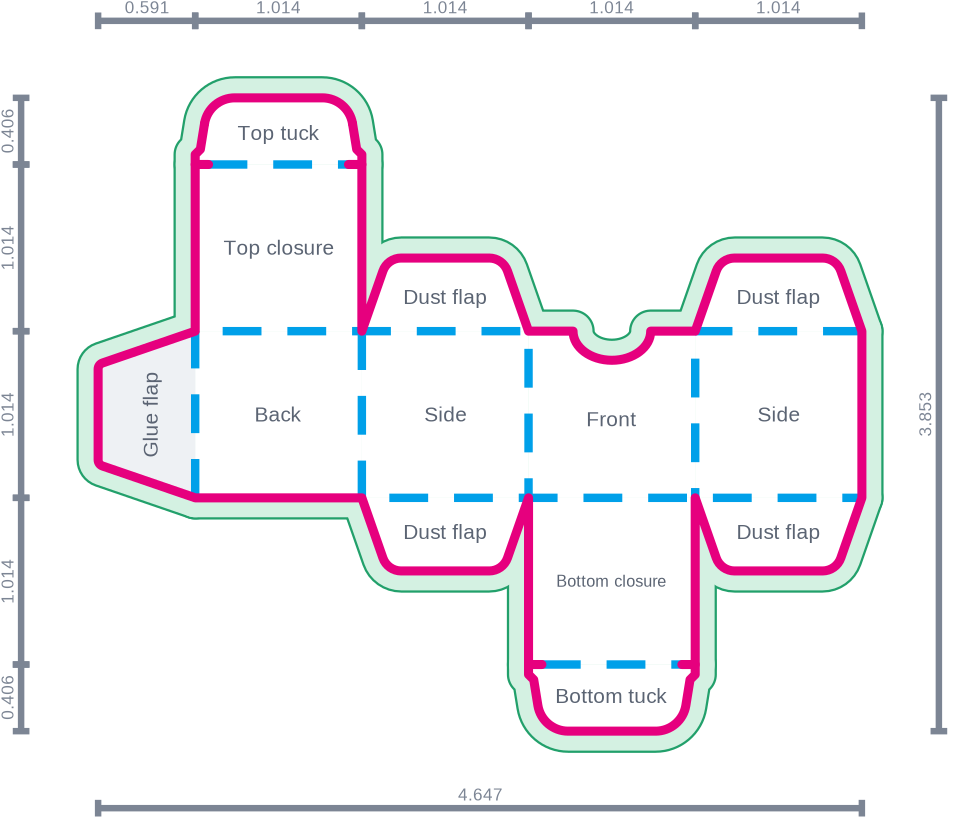
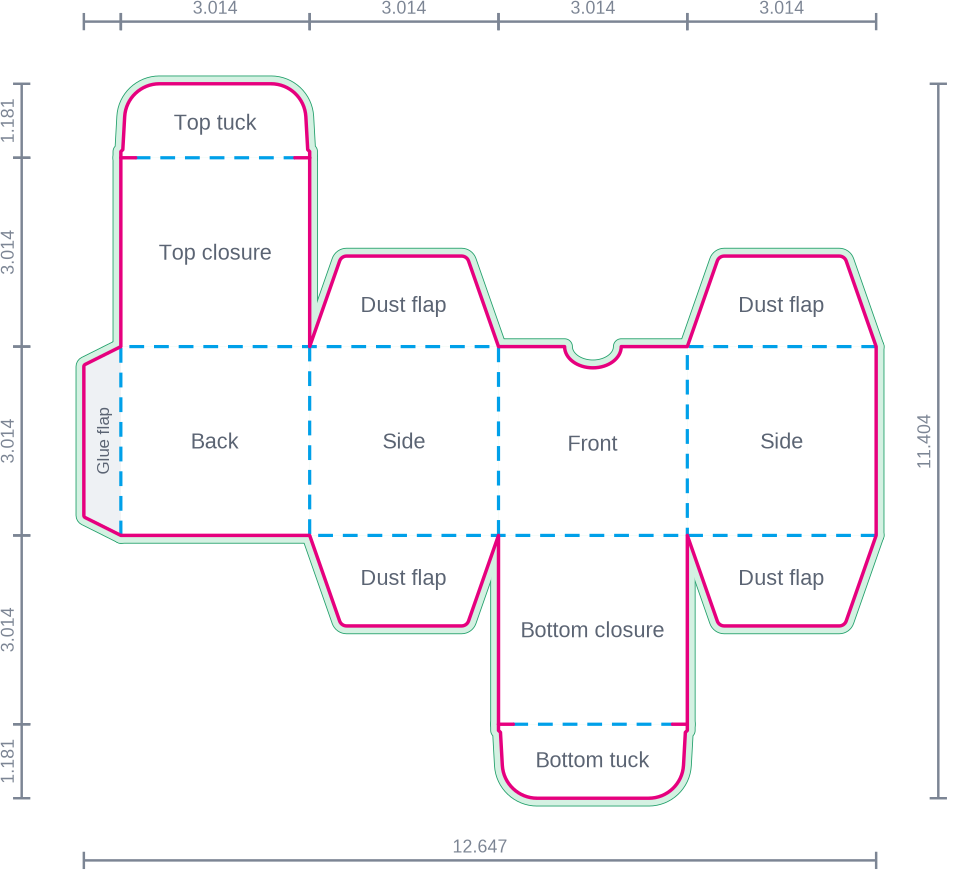
Each cube template below was drawn by the tool: a tuck end cube on 14 pt board, cut lines solid, crease lines dashed, bleed in green.

Flat dieline of a 1 inch cube box with tuck flaps and a glue flap
1 in cubeFits Letter and A4 as it is
Flat dieline of a 2 inch cube box with dimensions and panel names
2 in cubeFits Letter or A4 with dimensions hidden
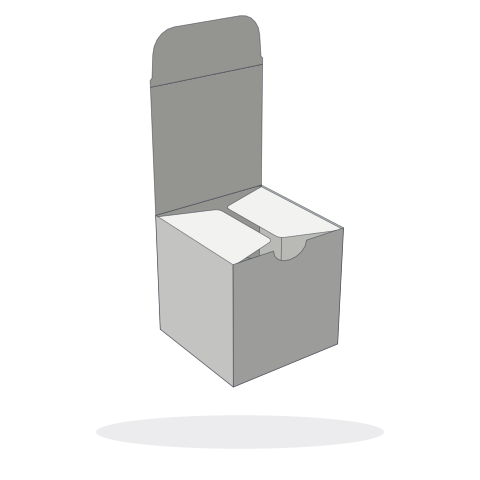
3D preview of a cube box folding from its flat dieline
3D viewThe same net folding into a cube
Flat dieline of a 3 inch cube box
3 in cubeLarger than A3: a print shop job
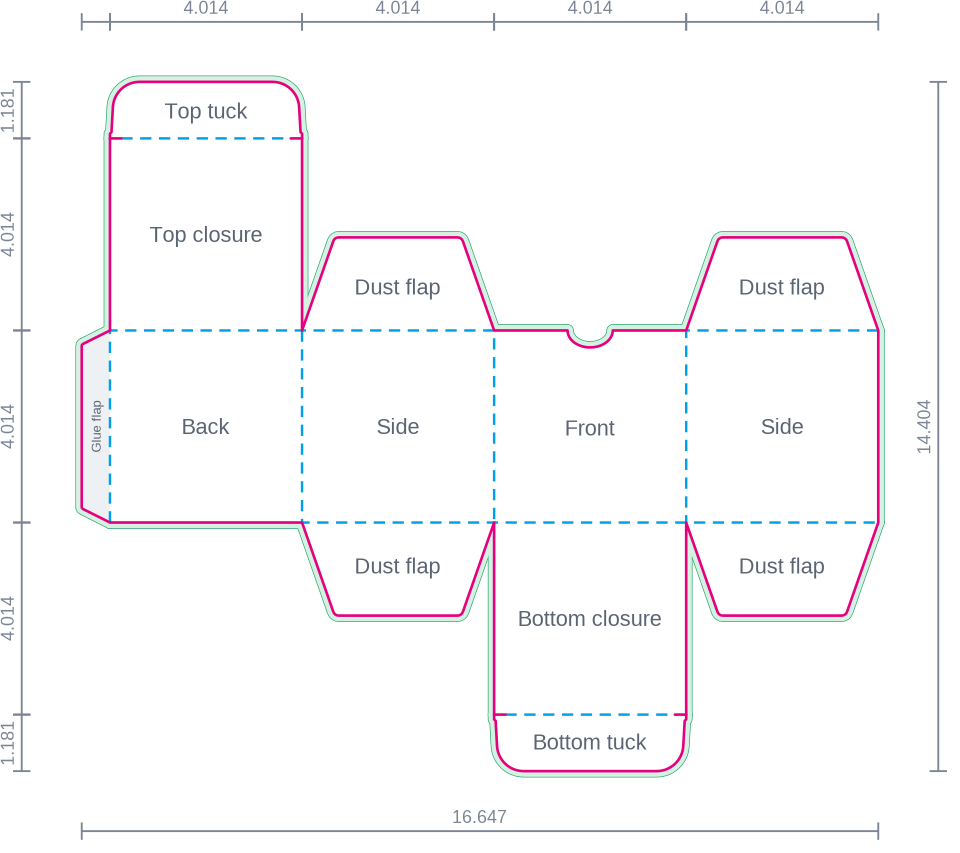
Flat dieline of a 4 inch cube box
4 in cubeFor a candle jar or a small gift

Real output of the tool. Use this example opens that size in the generator above.

Make a Cube Template to Print in Three Steps

From a number to a cube net you can cut and fold, in a few clicks.

  1. Type the same number for length, width and height, in inches or millimeters, or tap 1, 2, 3 or 4 in. Fractions such as 2 1/2 work too, and the size you type is the inside of the cube.

  2. Pick 14 to 24 pt SBS, kraft or a flute, or type the caliper of your own card. Then set the tuck, the dust flaps, a window or the thumb notch, and bleed of 3 mm, 1/8 in or none.

  3. Watch it fold in 3D, read the Checks tab, then download vector PDF, SVG, DXF or PNG. Print at 100%, cut the solid lines, score the dashed ones and glue the side flap.

A 1 inch cube template at its flat size

A Cube Cut Out Template Built Around Your Board

Not a fixed picture of a cube: a drawing that changes with every size and board you choose.

  1. Cube dieline with panel widths dimensioned along the top

    Exact size

    Inside size in, fold allowances added

    You type the inside of the cube and the drawing adds the board thickness at every fold, so a thick board does not shrink the space inside. Dimensions and panel names sit on their own layer, and the flat size shows under the preview.

  2. 3D fold preview of the cube box

    3D and checks

    See it fold, then read the warnings

    Play the 3D view, scrub the slider or drag to turn the cube. The Checks tab flags a board too thick for a small cube, dust flaps that nearly touch, a short tuck or a drawing that will not fit Letter or A4, each with a Why? note.

  3. Vector dieline of a 3 inch cube box

    Print files

    Vector files at 1:1

    The PDF keeps cut and crease as CutContour and Crease spot colors on their own layers. SVG comes in millimeters with separate layers, DXF R12 carries CUT and CREASE layers, and PNG prints at 300 dpi. SVG, PDF and DXF open in common vector and CAD programs.

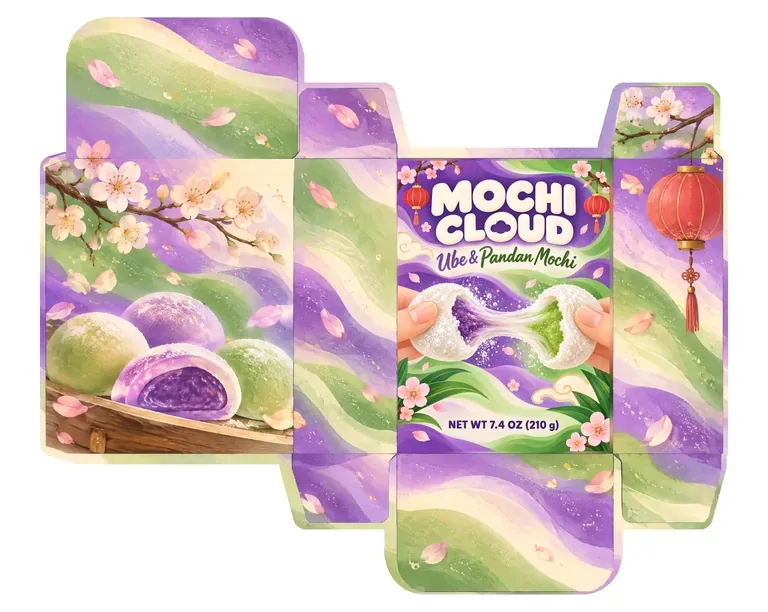
  4. Partner demo: purple and green mochi box artwork laid out on a flat dieline

    Artwork

    Lines here, design in the box designer

    The template is lines only. Place your artwork over it in your own design program, or follow Design this box with AI to the box designer, where AI designs use credits. The picture shows a partner demo made with AI.

Cube Template Paper, Sizes and Folding

Four short notes before you print your first cube.

Which paper or board to use

Cardstock is the usual cube template paper at home: it folds cleanly and holds square, where copy paper sags. Small product cubes are usually 14 to 18 pt SBS paperboard, and a thinner board suits a smaller cube.

Printing on your own card? Pick Custom in the Board step and type its thickness, so the fold allowances match the sheet in your printer.

Which size fits which sheet

The 1 in cube fits US Letter and A4 with every layer on. The 2 in cube fits either sheet once you hide Dimensions. The 3 and 4 in cubes are larger than A3, so print them on a wide format printer or at a print shop.

Any other size works too: the Checks tab tells you which sheet the flat cube fits.

How to cut and fold it

A clean fold starts with a scored crease. Work on a cutting mat with a metal ruler.

  1. 1Print at 100% with fit to page turned off.
  2. 2Cut along the solid lines, including the small slits at the tuck.
  3. 3Score each dashed line with a blunt point, then fold.
  4. 4Glue the side flap inside the far wall, then close the dust flaps and tucks.

The slit lock is on by default for paperboard: two short cuts at the tuck crease catch the dust flaps, so the lid stays shut without glue.

Cube net or cube box?

A math cube net is six squares in a cross, often with glue tabs. This cube template is a box net instead: four walls in a row, one glue flap, and tuck closures top and bottom, so the cube opens and closes again.

For a classroom cube that stays shut, glue the tucks. For other solids, try the rectangular prism net.

Who Uses This Cube Template

Classrooms, craft tables and small product launches.

  • Teachers and students

    A cut out cube template for volume lessons, dice and class projects, in inches or millimeters.

  • Gift and favor makers

    Small cube boxes for soap, candles, jewelry or party favors, sized to what goes inside.

  • Packaging designers

    A quick cube carton sample to test proportions and board before the die is ordered.

  • Crafters and makers

    Open the SVG in your vector program, add a pattern, then print and cut the cube net by hand.

Cube Template FAQ

Quick answers about sizes, paper and files.

Get Your Free Cube Template

Pick a size, choose the board and download a cube template to print as PDF, SVG, DXF or PNG. First download free, nothing uploaded.